
Building a drag and drop widget system
Build log, part 1: rolling a custom drag and drop widget grid on the raw HTML5 DnD API, after auditioning every Svelte library for the job.
Drag and drop functionality: the bane of every developer aiming to create something highly customizable.
A plethora of libraries attempt to abstract this process for future developers.
This week, I tackled it for a widget system I was tasked with building. As usual, I explored various libraries to avoid reinventing the wheel.
Existing wheels
Neodrag liked that they had different rendering and performance comparisons
Swapy Still in early development. Works on React but breaks on Svelte, according to Theo’s video.
Svelte flow Highly customizable with numerous features. Ideal for building Excalidraw-like applications.
Svelte-dnd-action Integrates smoothly with Svelte and is good at vertical and horizontal lists. However, I encountered difficulties adding transitions.
Sortable I liked their nesting feature, but ultimately didn’t choose it due to decision fatigue.
Back to Basics
After exploring numerous libraries and burning myself out, I opted for the simple HTML drag and drop API, referring to the MDN docs.
I began by implementing drag, drag over, and drop handlers between components.
This required a draggable element
<script>
  function dragstartHandler(ev) {
    // Add the target element's id to the data transfer object
    ev.dataTransfer.setData("text/plain", ev.target.id);
  }

  window.addEventListener("DOMContentLoaded", () => {
    // Get the element by id
    const element = document.getElementById("p1");
    // Add the ondragstart event listener
    element.addEventListener("dragstart", dragstartHandler);
  });
</script>

<p id="p1" draggable="true">This element is draggable.</p>
And something that’s droppable / a drop zone
<script>
  function dragoverHandler(ev) {
    ev.preventDefault();
    ev.dataTransfer.dropEffect = "move";
  }
  function dropHandler(ev) {
    ev.preventDefault();
    // Get the id of the target and add the moved element to the target's DOM
    const data = ev.dataTransfer.getData("text/plain");
    ev.target.appendChild(document.getElementById(data));
  }
</script>

<p id="target" ondrop="dropHandler(event)" ondragover="dragoverHandler(event)">
  Drop Zone
</p>
A drop zone is any element that implements both ondrop and ondragover handlers. As MDN explains:
By default, the browser prevents anything from happening when dropping something onto most HTML elements. To change that behavior so that an element becomes a drop zone or is droppable, the element must listen to both
[dragover](https://developer.mozilla.org/en-US/docs/Web/API/HTMLElement/dragover_event)and[drop](https://developer.mozilla.org/en-US/docs/Web/API/HTMLElement/drop_event)events.
At this point, I’m simply logging the events to the console to examine what I’m working with.
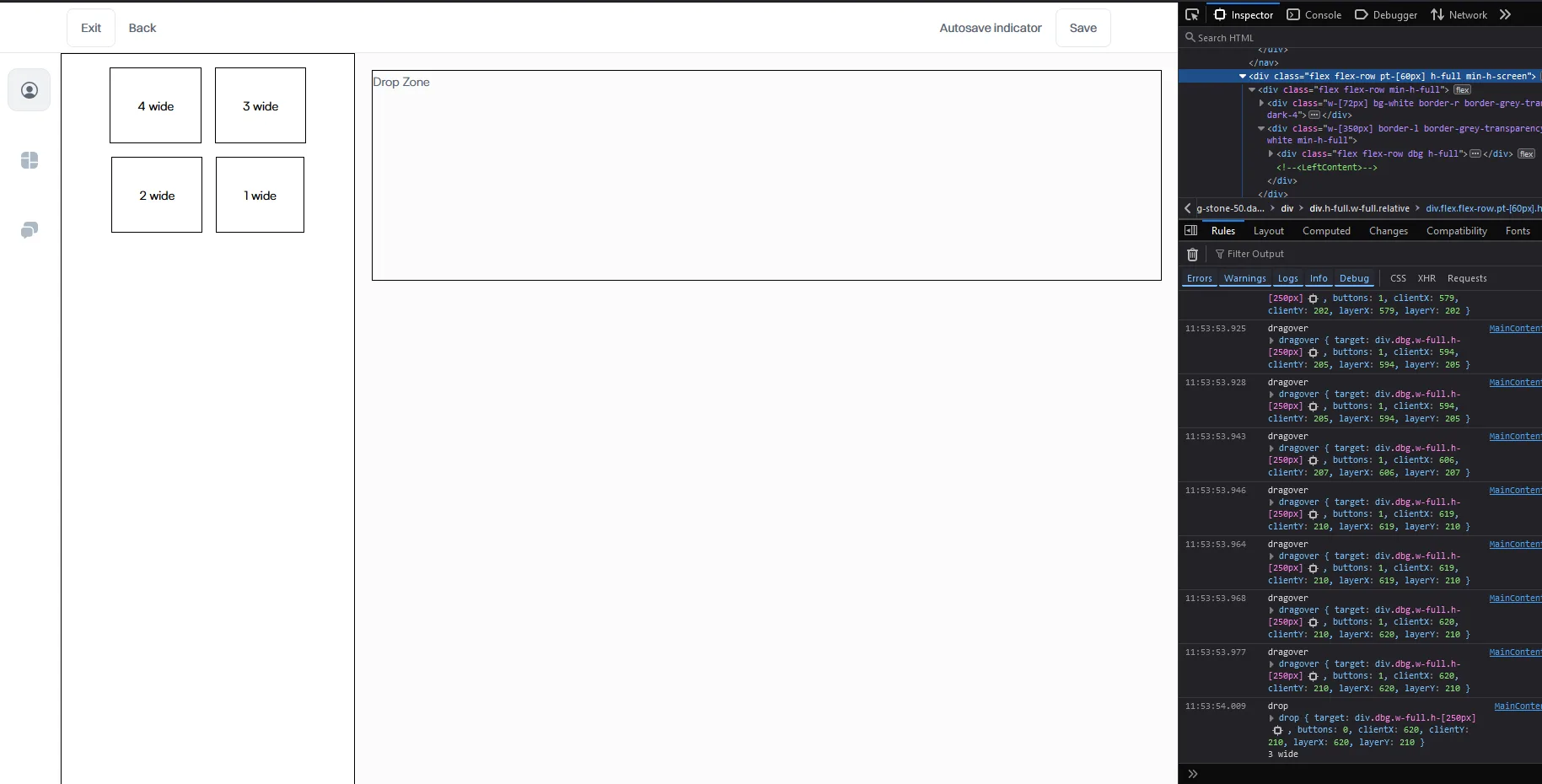
I notice the layerX and layerY attributes on the event object and want to make the drop zone component respond to the position.
Although I’ll need to make it respond to different sizing options later, let’s first expand the drop zone and make it react to drag overs.
On every drag over event, the component changes the top and left properties of an absolutely positioned “drop indicator” span.
These properties are set to match the layerX and layerY values from the drag over event, resulting in this effect:
    <span
      class=" h-10 absolute bg-white whitespace-nowrap"
      style="top: {dropindicatorY}px; left: {dropindicatorX}px;"
    >
      {dragIndicatorText}
    </span>
Now let’s perform calculations to adjust the drop indicator size based on whether the dragged element is 1-wide or x-wide.
To achieve this, I used the event.dataTransfer data to associate the innerText of the widgets with the drag over event.
I then implemented a switch case statement that alters the width property of the absolutely positioned element, resulting in different sizes for the drop indicator.
  const onDragOverHandler = (e: DragEvent) => {
    e.preventDefault();
    e.stopPropagation();

    const data = e.dataTransfer.getData('text/plain');
    const droppingOn = e.target as HTMLElement;
    // Find the position of the droppingOn releative to the viewport
    const rect = droppingOn.getBoundingClientRect();

    switch (data) {
      case '1 wide':
        dragIndicatorSize = 25;
        dragIndicatorText = '1 wide';
        break;
      case '2 wide':
        dragIndicatorSize = 50;
        dragIndicatorText = '2 wide';
        break;
      case '3 wide':
        dragIndicatorSize = 75;
        dragIndicatorText = '3 wide';
        break;
      case '4 wide':
        dragIndicatorSize = 100;
        dragIndicatorText = '4 wide';
        break;
    }

    if (e.clientX === 0) return;
    if (e.clientY === -1) return;

    dropindicatorX = e.clientX - rect.x == 0 ? dropindicatorX : e.clientX - rect.x;
    dropindicatorY = e.clientY - rect.y == 0 ? dropindicatorY : e.clientY - rect.y;
    console.log('Drop calc   ', e.clientX, e.clientY, rect.x, rect.y);
    console.log('Setting Drop indicator positions ', dropindicatorX, dropindicatorY);
}; <span
class=" h-10 absolute bg-white whitespace-nowrap"
style="top: {dropindicatorY}px; left: {dropindicatorX}px; width: {dragIndicatorSize}%;"
>
{dragIndicatorText}
</span>At this point i also switch from layerX and layerY to clientX and clientY since they are more stable and do calculations to find out the offset
According to Copilot :
Event Properties Misinterpretation: The
layerXandlayerYproperties you’re using to get the mouse position might not always give the expected results across different browsers or contexts. These properties are relative to the closest positioned ancestor element, which might not always behave consistently, especially if the DOM structure changes or in different browsers.
Now we must constrain the drop zones to be in a specific grid, and we should probably add a debounce to not fire every drag over but every some ms batch of events, and add transitions
So first off lets try locking the drop indicator to fixed x and y positions based on thresholds.
Wasted a bit of time since my drop indicator was firing drag over events of its own with layerX and layerY values of 0,0 or 0,-1 causing a glitchy snap to top left.
( As you can probably tell from the wonky ternary statements here that try to fallback if that happens )
    if (e.clientX === 0) return;
    if (e.clientY === -1) return;

    dropindicatorX = e.clientX - rect.x == 0 ? dropindicatorX : e.clientX - rect.x;
    dropindicatorY = e.clientY - rect.y == 0 ? dropindicatorY : e.clientY - rect.y;
Setting pointer events none fixed that , and also set the same on my indicator div’s , which i forgot were just aesthetics and not functional
  <div class="dbg w-full h-full relative" on:drop={onDropHandler} on:dragover={onDragOverHandler}>
    <span
      class=" h-10 absolute bg-white whitespace-nowrap pointer-events-none"
      style="top: {dropindicatorY}px; left: {dropindicatorX}px; width: {dragIndicatorSize}%;"
    >
      {dragIndicatorText}
    </span>

    <!-- lets have a bunch of zones that light up based on the y value  -->
    {#each Array(4) as x, i}
      <span class="flex flex-row h-60 pointer-events-none" class:bg-black={i === lightupIndex}> Drop zone </span>
    {/each}
  </div>
Things seem to be working better now
I should start handling state persistence soon , debouncing is also yet to be done
Code at this point
<script lang="ts">
  import { tweened } from 'svelte/motion';

  let dropindicatorX = 0;
  let dropindicatorY = 0;

  let dragIndicatorSize = 25;
  let dragIndicatorText = 'Drop indicator';

  $: lightupIndex = Math.floor(dropindicatorY / 240);
  $: console.log('lightupIndex', lightupIndex);

  const onDropHandler = (e: DragEvent) => {
    e.preventDefault();
    const data = e.dataTransfer.getData('text/plain');
    dropindicatorX = e.layerX;
    dropindicatorY = e.layerY;
    console.log('drop', e, data, e.layerX, e.layerY);
  };

  const onDragOverHandler = (e: DragEvent) => {
    e.preventDefault();
    e.stopPropagation();

    const data = e.dataTransfer.getData('text/plain');
    const droppingOn = e.target as HTMLElement;
    // Find the position of the droppingOn releative to the viewport
    const rect = droppingOn.getBoundingClientRect();

    switch (data) {
      case '1 wide':
        dragIndicatorSize = 25;
        dragIndicatorText = '1 wide';
        break;
      case '2 wide':
        dragIndicatorSize = 50;
        dragIndicatorText = '2 wide';
        break;
      case '3 wide':
        dragIndicatorSize = 75;
        dragIndicatorText = '3 wide';
        break;
      case '4 wide':
        dragIndicatorSize = 100;
        dragIndicatorText = '4 wide';
        break;
    }

    if (e.clientX === 0) return;
    if (e.clientY === -1) return;

    dropindicatorX = e.clientX - rect.x == 0 ? dropindicatorX : e.clientX - rect.x;
    dropindicatorY = e.clientY - rect.y == 0 ? dropindicatorY : e.clientY - rect.y;
    console.log('Drop calc   ', e.clientX, e.clientY, rect.x, rect.y);
    console.log('Setting Drop indicator positions ', dropindicatorX, dropindicatorY);
    // Debounce and update the tweens
  };
</script>

<div
  class="w-full flex flex-col gap-4 bg-grey-neutral-10 text-blueish-grey-700 font-satoshi p-5 transition-all"
>
  <!-- svelte-ignore a11y-no-static-element-interactions -->
  <div class="dbg w-full h-full relative" on:drop={onDropHandler} on:dragover={onDragOverHandler}>
    <span
      class=" h-10 absolute bg-white whitespace-nowrap pointer-events-none"
      style="top: {dropindicatorY}px; left: {dropindicatorX}px; width: {dragIndicatorSize}%;"
    >
      {dragIndicatorText}
    </span>

    <!-- lets have a bunch of zones that light up based on the y value  -->
    {#each Array(4) as x, i}
      <span class="flex flex-row h-60 pointer-events-none" class:bg-black={i === lightupIndex}> Drop zone </span>
    {/each}
  </div>
</div>
On drop i should spawn the actual element on the drag over div , persist the position in local storage or the database
But for now lets try to do the logic for horizontal positioning
This is how I’m thinking of making the different sizes not overflow out of the grid
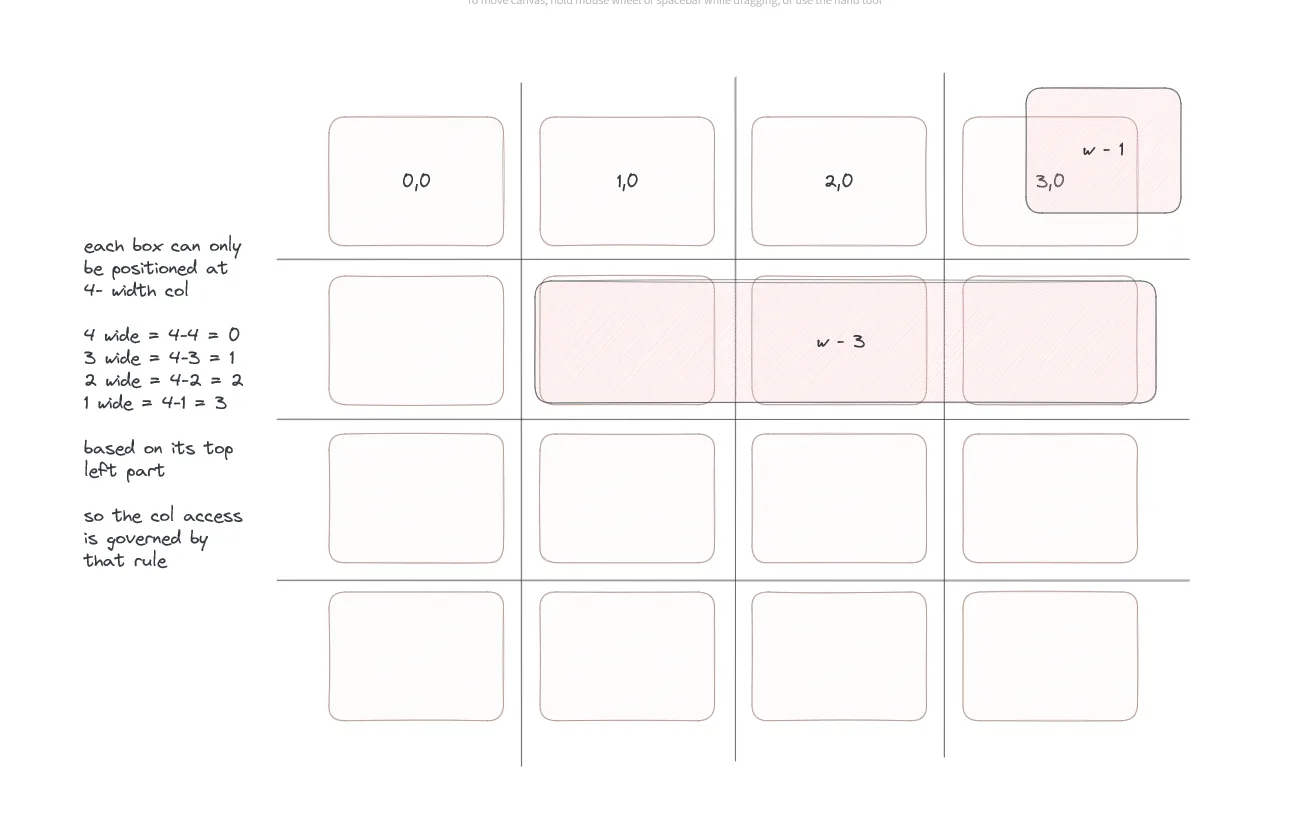
To find the column that the drop occurred on , we can divide the drop indicator x position with the client width of the whole drop zone ( which gives as a 0-1 float of where it is horizontally ) Then multiply it by 4 and take the floor of that to get a 0-4 column value that we store in a reactive lightupColumnIndex variable
$: lightupColumnIndex = Math.floor((dropindicatorX / cw) * 4);
  <!-- Bind the client width of the entire drop zone to cw -->
  <div
    class="dbg w-full h-full relative"
    bind:clientWidth={cw}
    on:drop={onDropHandler}
    on:dragover={onDragOverHandler}
  >
We now have both the row and column coordinates of the drag location, which will help us constrain the widgets to a grid.
Now we do the drop validity calculation , since 4 wide’s cant be dropped on a drop zone col that isn’t 0 for example , we must show that on the drop indicator , or on the cell itself
Now lets tween snap the position of the widget to the appropriate valid location , and lets also reset the position of widgets dropped on invalid locations
Code at this point
<script lang="ts">
  import { tweened } from 'svelte/motion';

  let cw = 0;

  let dropindicatorX = 0;
  let dropindicatorY = 0;

  let dragIndicatorSize = 25;
  let dragIndicatorText = 'Drop indicator';

  $: lightupIndex = Math.floor(dropindicatorY / 240);
  $: lightupColumnIndex = Math.floor((dropindicatorX / cw) * 4);

  let boxsize = 4; // assume 4 wides by default
  let maxValidForBox = 0; // assume 4 wide validity at first

  let isValid = true;

  const onDropHandler = (e: DragEvent) => {
    e.preventDefault();
    const data = e.dataTransfer.getData('text/plain');
    dropindicatorX = e.layerX;
    dropindicatorY = e.layerY;
    console.log('drop', e, data, e.layerX, e.layerY);

    // Need to spawn an actual dom element on that position instead of the drop indicator

  };

  const onDragOverHandler = (e: DragEvent) => {
    e.preventDefault();
    e.stopPropagation();

    const data = e.dataTransfer.getData('text/plain');
    const droppingOn = e.target as HTMLElement;
    // Find the position of the droppingOn releative to the viewport
    const rect = droppingOn.getBoundingClientRect();

    switch (data) {
      case '1 wide':
        dragIndicatorSize = 25;
        boxsize = 1;
        dragIndicatorText = '1 wide';
        break;
      case '2 wide':
        dragIndicatorSize = 50;
        boxsize = 2;
        dragIndicatorText = '2 wide';
        break;
      case '3 wide':
        dragIndicatorSize = 75;
        boxsize = 3;
        dragIndicatorText = '3 wide';
        break;
      case '4 wide':
        dragIndicatorSize = 100;
        boxsize = 4;
        dragIndicatorText = '4 wide';
        break;
    }

    if (e.clientX === 0) return;
    if (e.clientY === -1) return;

    dropindicatorX = e.clientX - rect.x == 0 ? dropindicatorX : e.clientX - rect.x;
    dropindicatorY = e.clientY - rect.y == 0 ? dropindicatorY : e.clientY - rect.y;

    maxValidForBox = 4 - boxsize;
    isValid = lightupColumnIndex <= maxValidForBox;

    console.log('Drop calc   ', e.clientX, e.clientY, rect.x, rect.y);
    console.log('Setting Drop indicator positions ', dropindicatorX, dropindicatorY);
  };
</script>

<div
  class="w-full flex flex-col gap-4 bg-grey-neutral-10 text-blueish-grey-700 font-satoshi p-5 transition-all"
>
  <!-- svelte-ignore a11y-no-static-element-interactions -->
  <div
    class="dbg w-full h-full relative"
    bind:clientWidth={cw}
    on:drop={onDropHandler}
    on:dragover={onDragOverHandler}
  >
    <span
      class=" h-10 absolute whitespace-nowrap pointer-events-none border border-black"
      class:bg-red-400={!isValid}
      class:bg-white={isValid}
      style="top: {dropindicatorY}px; left: {dropindicatorX}px; width: {dragIndicatorSize}%;"
    >
      {dragIndicatorText}
    </span>

    <!-- lets have a bunch of zones that light up based on the y value  -->
    {#each Array(10) as _, i}
      <span
        class="flex flex-row h-60 pointer-events-none transition-all justify-between"
        class:bg-black={i === lightupIndex}
      >
        {#each Array(4) as _, j}
          <span
            class="flex flex-col pointer-events-none transition-all w-full"
            class:bg-red-400={j === lightupColumnIndex}
          >
            Drop zone ( {i}, {j} )
          </span>
        {/each}
      </span>
    {/each}
  </div>
</div>
Added a scale transition on the drop indicator and moved the rendering logic to the drop handler
Now adding the width into consideration
Spiced up the styles a bit now that we are getting somewhere , and added a scale in animation
To make sure the indicator gets hidden when user drags the widget off the drop zone , also mouse based events don’t fire on dragging ( According to copilot )
When dragging elements (or files) over a web page, the browser’s default behavior is to not trigger mouse events like
mouseenterandmouseleaveon elements. This is because during a drag operation, the browser is in a different mode where it primarily listens for drag-related events (dragenter,dragover,dragleave,drop, etc.) rather than mouse events. This behavior is by design to facilitate drag-and-drop operations without interference from mouse movement events.
on:dragleave={() => (dropVisible = false)}Code at this point
Draggables ( I’m aware of the dupe code , ill edit it on the next edition)
<script>
  // Updated dragStartHandler to accept size and type as arguments
  const dragStartHandler = (e, size, type) => {
    // Create an object with both size and type
    const data = { size, type };

    // Stringify the object and set it as the data transfer object's data
    e.dataTransfer.dropEffect = 'move';
    e.dataTransfer.setData('application/json', JSON.stringify(data));
  };
</script>

<div class=" flex flex-row dbg h-full">
  <div class="flex flex-row justify-center items-center flex-wrap gap-4 h-fit p-4">
    <!-- svelte-ignore a11y-no-static-element-interactions -->
    <span
      on:dragstart={e => {
        // Extract the size from the element's inner text here
        const size = 4;
        // Define the type, this could also be dynamic based on the element or other conditions
        const type = 'widget1';
        dragStartHandler(e, size, type);
      }}
      draggable="true"
      class="dbg p-8 bg-white"
    >
      4 wide
    </span>
    <!-- svelte-ignore a11y-no-static-element-interactions -->
    <span
      on:dragstart={e => {
        // Extract the size from the element's inner text here
        const size = 3;
        // Define the type, this could also be dynamic based on the element or other conditions
        const type = 'widget1';
        dragStartHandler(e, size, type);
      }}
      draggable="true"
      class="dbg p-8 bg-white"
    >
      3 wide
    </span>
    <!-- svelte-ignore a11y-no-static-element-interactions -->
    <span
      on:dragstart={e => {
        // Extract the size from the element's inner text here
        const size = 2;
        // Define the type, this could also be dynamic based on the element or other conditions
        const type = 'widget1';
        dragStartHandler(e, size, type);
      }}
      draggable="true"
      class="dbg p-8 bg-white"
    >
      2 wide
    </span>
    <!-- svelte-ignore a11y-no-static-element-interactions -->

    <span
      on:dragstart={e => {
        // Extract the size from the element's inner text here
        const size = 1;
        // Define the type, this could also be dynamic based on the element or other conditions
        const type = 'widget1';
        dragStartHandler(e, size, type);
      }}
      draggable="true"
      class="dbg p-8 bg-white"
    >
      1 wide
    </span>
  </div>
  <div class="flex flex-row justify-center items-center flex-wrap gap-4 h-fit p-4 bg-slate-500">
    <!-- svelte-ignore a11y-no-static-element-interactions -->
    <span
      on:dragstart={e => {
        // Extract the size from the element's inner text here
        const size = 4;
        // Define the type, this could also be dynamic based on the element or other conditions
        const type = 'widget2';
        dragStartHandler(e, size, type);
      }}
      draggable="true"
      class="dbg p-8 bg-white"
    >
      4 wide
    </span>
    <!-- svelte-ignore a11y-no-static-element-interactions -->
    <span
      on:dragstart={e => {
        // Extract the size from the element's inner text here
        const size = 3;
        // Define the type, this could also be dynamic based on the element or other conditions
        const type = 'widget2';
        dragStartHandler(e, size, type);
      }}
      draggable="true"
      class="dbg p-8 bg-white"
    >
      3 wide
    </span>
    <!-- svelte-ignore a11y-no-static-element-interactions -->
    <span
      on:dragstart={e => {
        // Extract the size from the element's inner text here
        const size = 2;
        // Define the type, this could also be dynamic based on the element or other conditions
        const type = 'widget2';
        dragStartHandler(e, size, type);
      }}
      draggable="true"
      class="dbg p-8 bg-white"
    >
      2 wide
    </span>
    <!-- svelte-ignore a11y-no-static-element-interactions -->

    <span
      on:dragstart={e => {
        // Extract the size from the element's inner text here
        const size = 1;
        // Define the type, this could also be dynamic based on the element or other conditions
        const type = 'widget2';
        dragStartHandler(e, size, type);
      }}
      draggable="true"
      class="dbg p-8 bg-white"
    >
      1 wide
    </span>
  </div>
</div>

<style lang="postcss">
  span {
    @apply font-lexend text-sm rounded-10 border-dark-60 bg-dark-10 text-dark-50 transition-all cursor-grab;
  }
  span:hover {
    @apply bg-dark-20;
  }
</style>
Drop zone
<script lang="ts">
  import { quintInOut, quintOut } from 'svelte/easing';

  import { scale } from 'svelte/transition';

  let state = [[], [], [], []];

  let cw = 0;

  let dropVisible = false;

  let dropindicatorX = 0;
  let dropindicatorY = 0;

  let dragIndicatorSize = 25;
  let dragIndicatorText = 'Drop indicator';

  $: lightupIndex = Math.floor(dropindicatorY / 240);
  $: lightupColumnIndex = Math.floor((dropindicatorX / cw) * 4);

  let boxsize = 4; // assume 4 wides by default
  let maxValidForBox = 0; // assume 4 wide validity at first

  let isValid = true;

  const onDropHandler = (e: DragEvent) => {
    e.preventDefault();

    // Need to spawn an actual dom element on that position instead of the drop indicator

    // fade out the drop indicator , fade in the actual element
    dropVisible = false;

    // Maybe mutate a global store ?? bad idea since our global state is so polluted

    if (isValid) {
      for (let i = lightupColumnIndex; i <= lightupColumnIndex + boxsize - 1; i++) {
        state[lightupIndex][i] = dragIndicatorText;
      }
    }

    console.log(state, e);
  };

  const onDragOverHandler = (e: DragEvent) => {
    e.preventDefault();
    e.stopPropagation();
    dropVisible = true;

    const dataString = e.dataTransfer.getData('application/json');
    const { size, type } = JSON.parse(dataString);

    const droppingOn = e.target as HTMLElement;
    // Find the position of the droppingOn releative to the viewport
    const rect = droppingOn.getBoundingClientRect();

    switch (size) {
      case 1:
        dragIndicatorSize = 25;
        boxsize = 1;
        dragIndicatorText = '1 wide';
        break;
      case 2:
        dragIndicatorSize = 50;
        boxsize = 2;
        dragIndicatorText = '2 wide';
        break;
      case 3:
        dragIndicatorSize = 75;
        boxsize = 3;
        dragIndicatorText = '3 wide';
        break;
      case 4:
        dragIndicatorSize = 100;
        boxsize = 4;
        dragIndicatorText = '4 wide';
        break;
    }

    if (e.clientX === 0) return;
    if (e.clientY === -1) return;

    dropindicatorX = e.clientX - rect.x == 0 ? dropindicatorX : e.clientX - rect.x;
    dropindicatorY = e.clientY - rect.y == 0 ? dropindicatorY : e.clientY - rect.y;

    maxValidForBox = 4 - boxsize;
    isValid = lightupColumnIndex <= maxValidForBox;
  };
</script>

<div
  class="w-full flex flex-col gap-4 bg-grey-neutral-10 text-blueish-grey-700 font-satoshi p-5 transition-all"
>
  <!-- svelte-ignore a11y-no-static-element-interactions -->
  <!-- svelte-ignore a11y-mouse-events-have-key-events -->
  <div
    class="dbg w-full h-full relative"
    bind:clientWidth={cw}
    on:drop={onDropHandler}
    on:dragover={onDragOverHandler}
    on:dragleave={() => (dropVisible = false)}
  >
    {#if dropVisible}
      <span
        transition:scale={{ duration: 300, start: 0.9, easing: quintInOut }}
        class="dropzone-indicator"
        class:bg-red-900={!isValid}
        class:bg-white={isValid}
        style="
        transform-origin: top left;
        top: {dropindicatorY}px;
        left: {dropindicatorX}px;
        width: {dragIndicatorSize}%;
        "
      >
        {dragIndicatorText}
      </span>
    {/if}
    <!-- lets have a bunch of zones that light up based on the y value  -->
    {#each Array(10) as _, i}
      <span
        class="flex flex-row h-60 pointer-events-none transition-all justify-between"
        class:bg-red-200={i === lightupIndex}
      >
        {#each Array(4) as _, j}
          {#if state && state[i] && state[i][j]}
            {@const shade = parseInt(state[i][j].split(' ')[0]) + 5}
            <!-- TODO: If we store type on the state , we can render different widgets here based on a switch case component or a big if elif else  -->

            <span
              transition:scale={{ duration: 200 + 300 * j, start: 0.9, easing: quintOut }}
              class="dropzone-indicator-filled"
              style={`background-color: rgb(0 0 0 / 0.${shade})`}
            >
              {state[i][j]}
            </span>
          {:else}
            <span class="dropzone-indicator-cell" class:bg-red-400={j === lightupColumnIndex}>
              Drop zone ( {i}, {j} )
            </span>
          {/if}
        {/each}
      </span>
    {/each}
  </div>
</div>

<style lang="postcss">
  .dropzone-indicator {
    @apply py-8 absolute whitespace-nowrap pointer-events-none border border-black scale-90 justify-center items-center text-black font-lexend text-2xl font-extralight text-center rounded-14 transition-colors duration-500;
  }

  .dropzone-indicator-cell {
    @apply flex flex-col pointer-events-none transition-all w-full justify-center items-center text-grey-neutral-80 font-lexend;
  }

  .dropzone-indicator-filled {
    @apply flex flex-col pointer-events-none transition-all w-full justify-center items-center text-white font-lexend text-2xl font-extralight;
  }
</style>
Going to implement these features next time , but for now that’s all 🙏🏼
What’s left
- Rearranging
- Delete widget
- Persistence
- Debounce
- Widget type variations
- Widget state
Gifs recorded by https://getsharex.com/